

If your business shows up on Google when you search its name, your Google Business Profile is working. That just isn’t the search your customers run. They search for what you do, from where they live, and Google decides who shows up from three things working together: your Google profile, your reviews, and your website. A website alone won’t get you there. Neither will great reviews alone.
We looked at 400 well-reviewed service businesses around Columbus to see what gets in the way. Every one of them has the reputation. What’s usually missing is whatever tells Google, and the person deciding who to call, that they’re the right business for the job.
First, Rule Out a Broken Profile or Website
Sometimes the problem really is the profile, or the website. Take two minutes:
- Is it verified? Sign in to your Google Business Profile and look for a notice that it’s unverified, suspended, or under review.
- Did you just change something? Edits to your name, address, phone, or category can sit in review before they show.
- Are you seeing what customers see? Search signed out, from a private window or someone else’s phone.
- Is your website in Google at all? Search site:yourbusiness.com, with your own domain. If nothing comes up, Google hasn’t indexed the site yet, and that’s the first thing to fix.
If that all checks out and you can find yourself by name, your profile and site work. The real question is why you don’t show up when a stranger needs what you sell.
The Real Test: Search Your Service From Where Your Customers Are
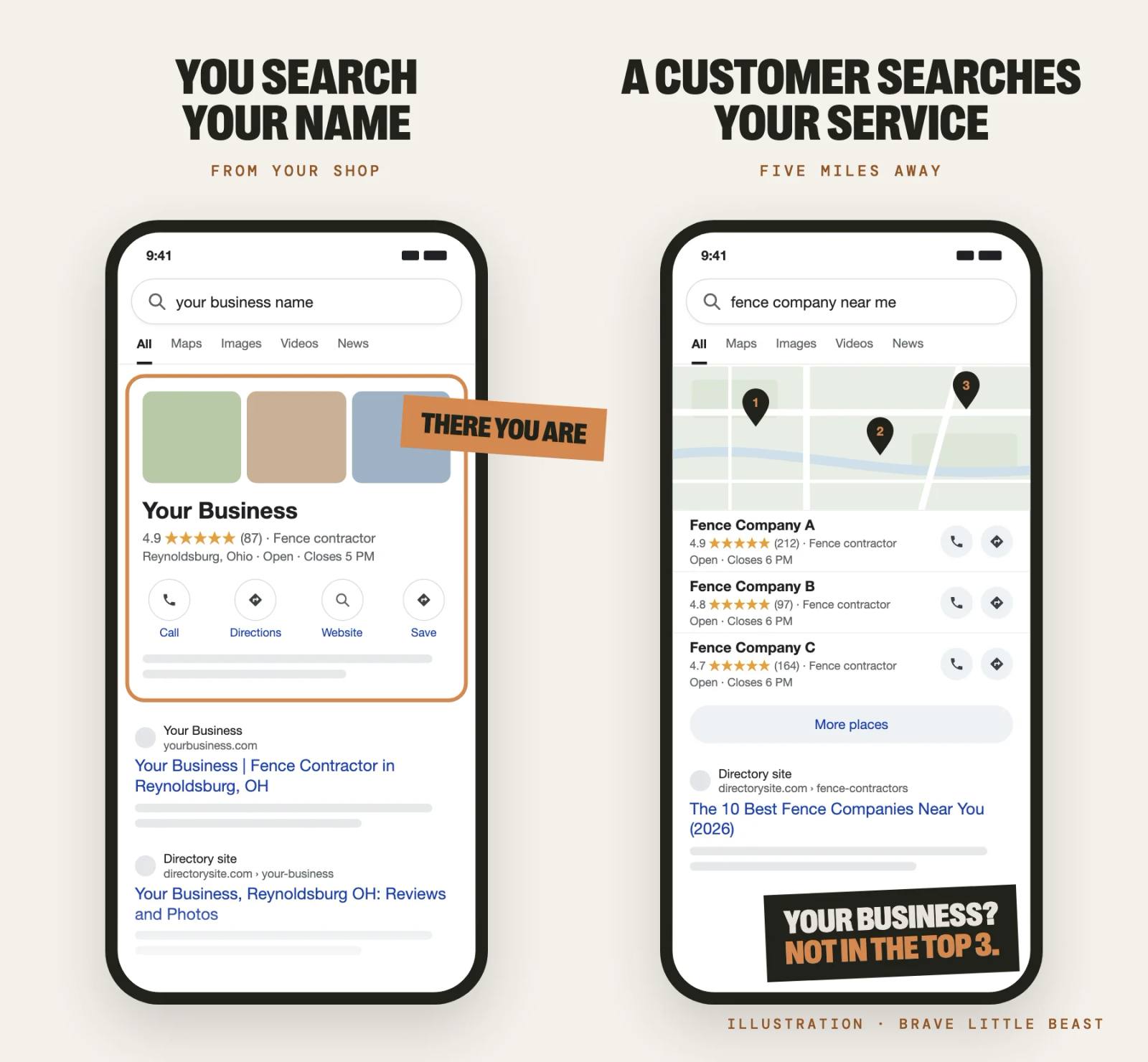
Most people who find a local business never type its name. In BrightLocal’s study of 45,000 business profiles, 84 percent of the searches that surfaced a profile were for a kind of business, like “septic service” (2019). So run the search your customers run:
- Pick your two or three money searches, worded the way a customer types them: “septic pumping near me,” “fence company Pickerington,” “daycare near me.”
- Search from where your customers are, not from your shop. Google weighs how close you are to the searcher, so your own office flatters you. Try it from a job site across town, or ask a customer to send a screenshot.
- Use a phone, signed out. 73 percent of people started their latest local search on a phone (BrightLocal, 2026).
- Write down where you land: top three on the map, further down, or nowhere. 72 percent of people look at three or fewer businesses before they decide (BrightLocal, 2026).
We run this test at scale with a map grid: the same search from 49 spots across about a 12-mile square. Here’s one real Central Ohio business.
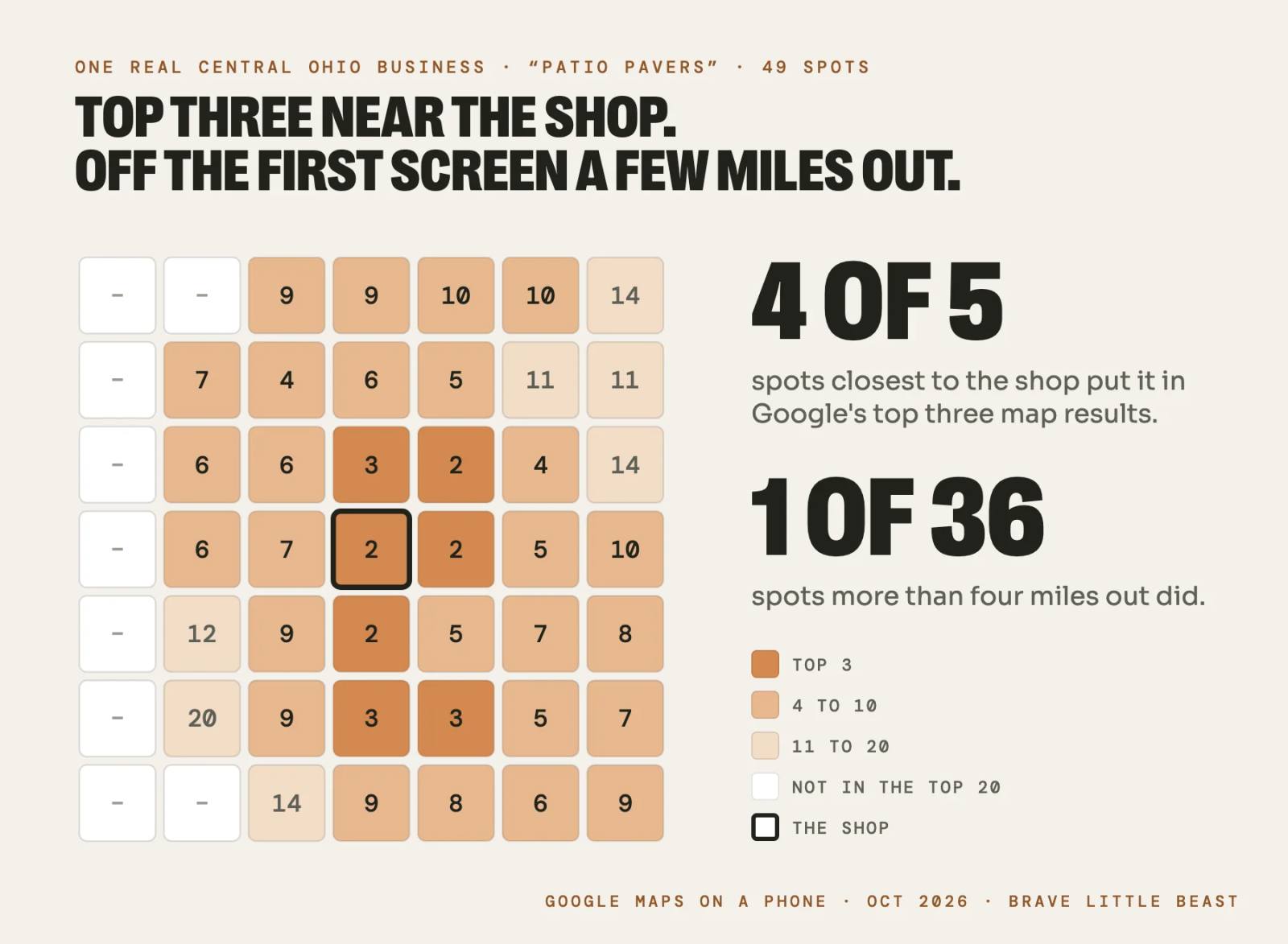
Same business, same reviews. The only thing that changed was where the search came from, and that’s where most of the work is.
How Google Decides Who Shows Up
Google’s help page names the three things behind who shows up on Google Maps: “Local results are mainly based on relevance, distance, and popularity” (Google Business Profile Help).
- Relevance is how well you match the search: your categories, your services, and the words on your website.
- Distance is how far you are from the searcher, or from the town they typed. You can’t move your shop, so the other two carry more of the load.
- Popularity (Google also calls it prominence) is how well known you are: your reviews and rating, links from other websites, and mentions around the web.
Google also says there’s no way to pay for a better local ranking. You can buy an ad above the results, not a spot in them.
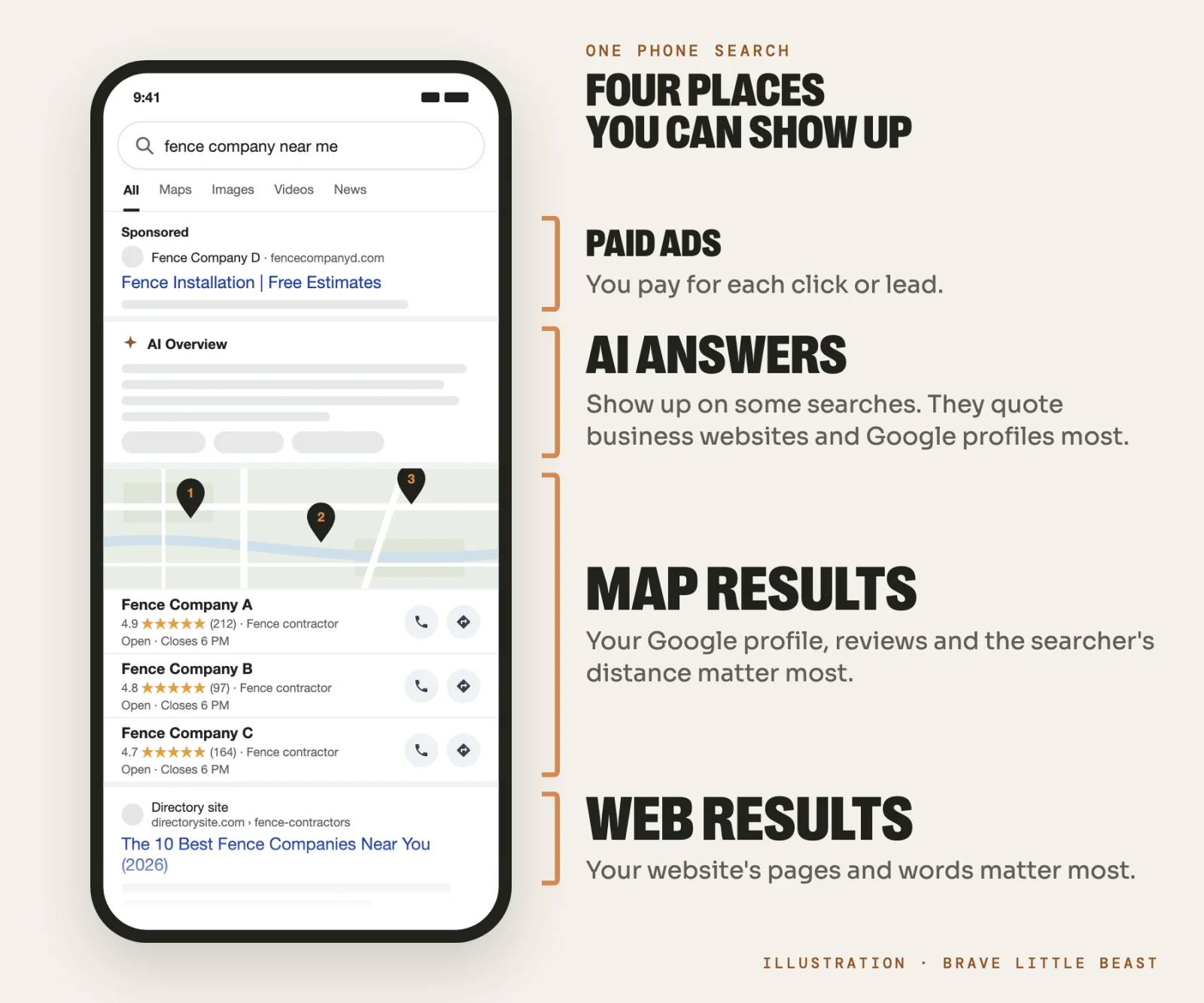
Each place on that screen runs on different signals. Map results lean on your Google Business Profile and reviews, plus how close you are. Web results lean on your website and the sites that link to it. AI answers appear on some searches: Google’s AI answers showed up on 15 percent of “near me” searches and 92 percent of question searches in Whitespark’s tests. When AI tools recommend local businesses, the businesses’ own websites are the source they cite most, 42 percent of all citations in BrightLocal’s study of about 2 million citations, with Google profiles the top single source.
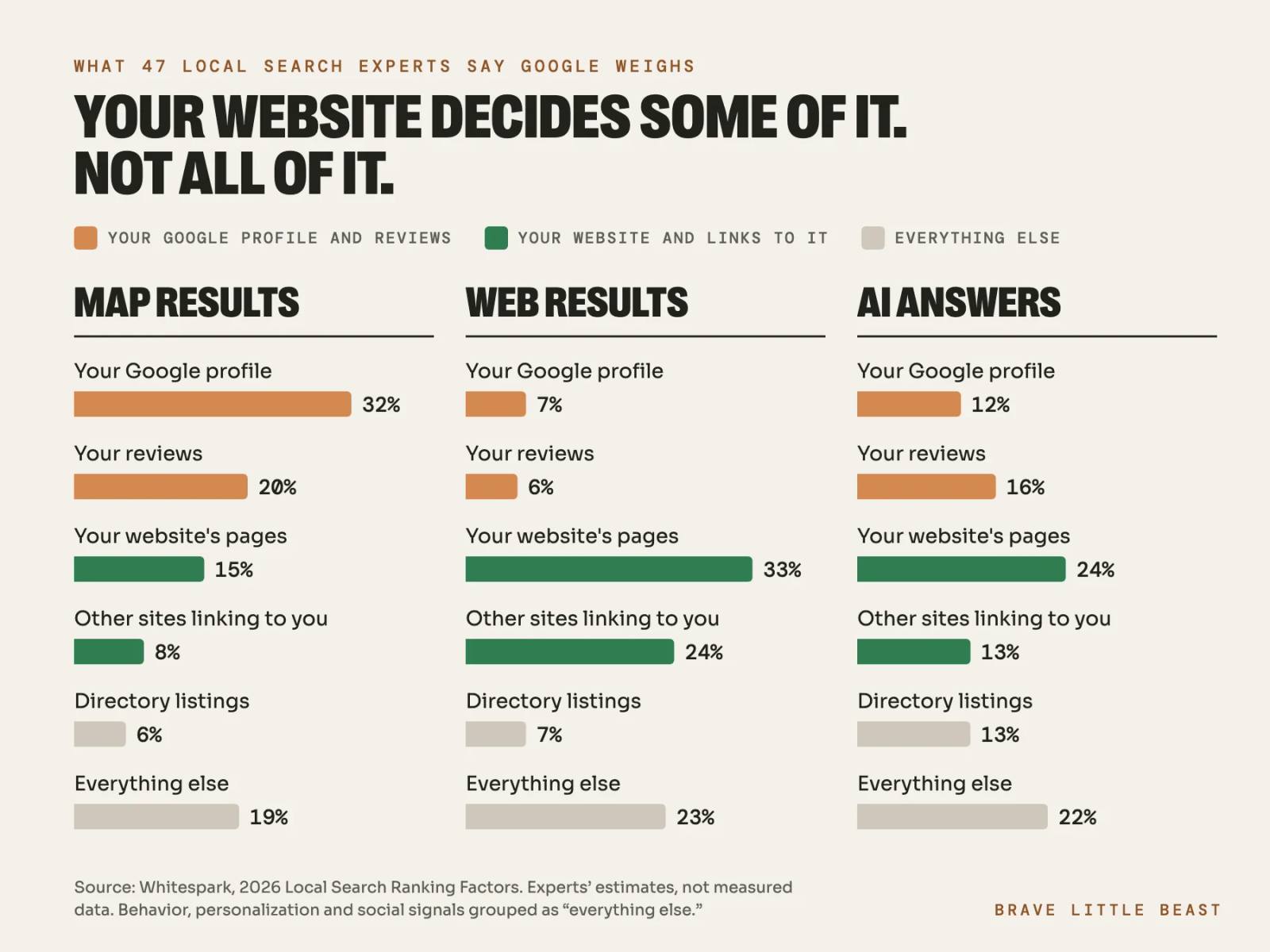
Whitespark also asks dozens of local search experts how much weight Google gives each kind of signal. Their 2026 answers show why a website alone doesn’t get a service business found, and why a great profile with a thin website hits a ceiling too.
What We Found Looking at 400 Central Ohio Service Businesses
In October 2026, we pulled 400 independent service businesses around Columbus from Google Maps: fence, concrete, and landscaping companies; septic, well, and excavation contractors; chimney and masonry pros; and childcare centers. Every one had at least 4.3 stars and 15 reviews, and the typical one had 4.8 stars from 39. People like these businesses.
About 1 in 7 (58 of 400) had no website, used a Facebook page instead, or had a site that didn’t work, including error pages, domains that no longer load, and three that now send visitors to gambling spam.
We opened 311 working homepages the way a customer would, on a phone.
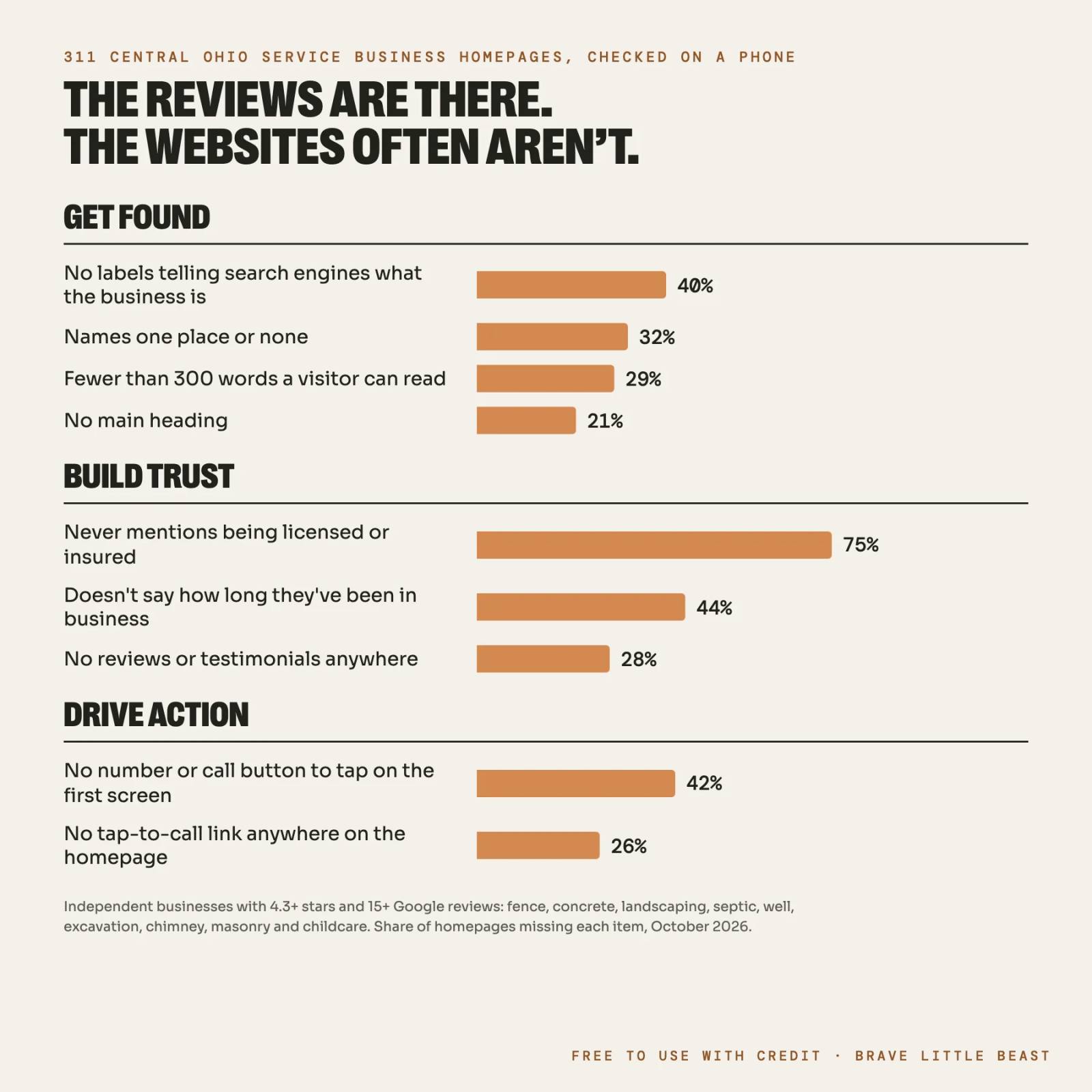
- 42 percent had no phone number or call button to tap on the first screen, the screen that decides whether someone calls.
- 75 percent never mention being licensed or insured, in the text or in image labels.
- 40 percent have none of the labels search engines read to identify the business: what it is, where it is, when it’s open.
- 32 percent name one place or none, even counting the code behind the page.
The search results show the same gap from the other side. On 40 Columbus-area searches for 20 kinds of local services, sites like Yelp, Angi, BBB, and Facebook took about half of the top 10 web results. That’s room a local business’s own website could be taking.
What It Takes: Get Found, Build Trust, Drive Action
Showing up is three jobs, and your profile, your reviews, and your website each do part of every one.
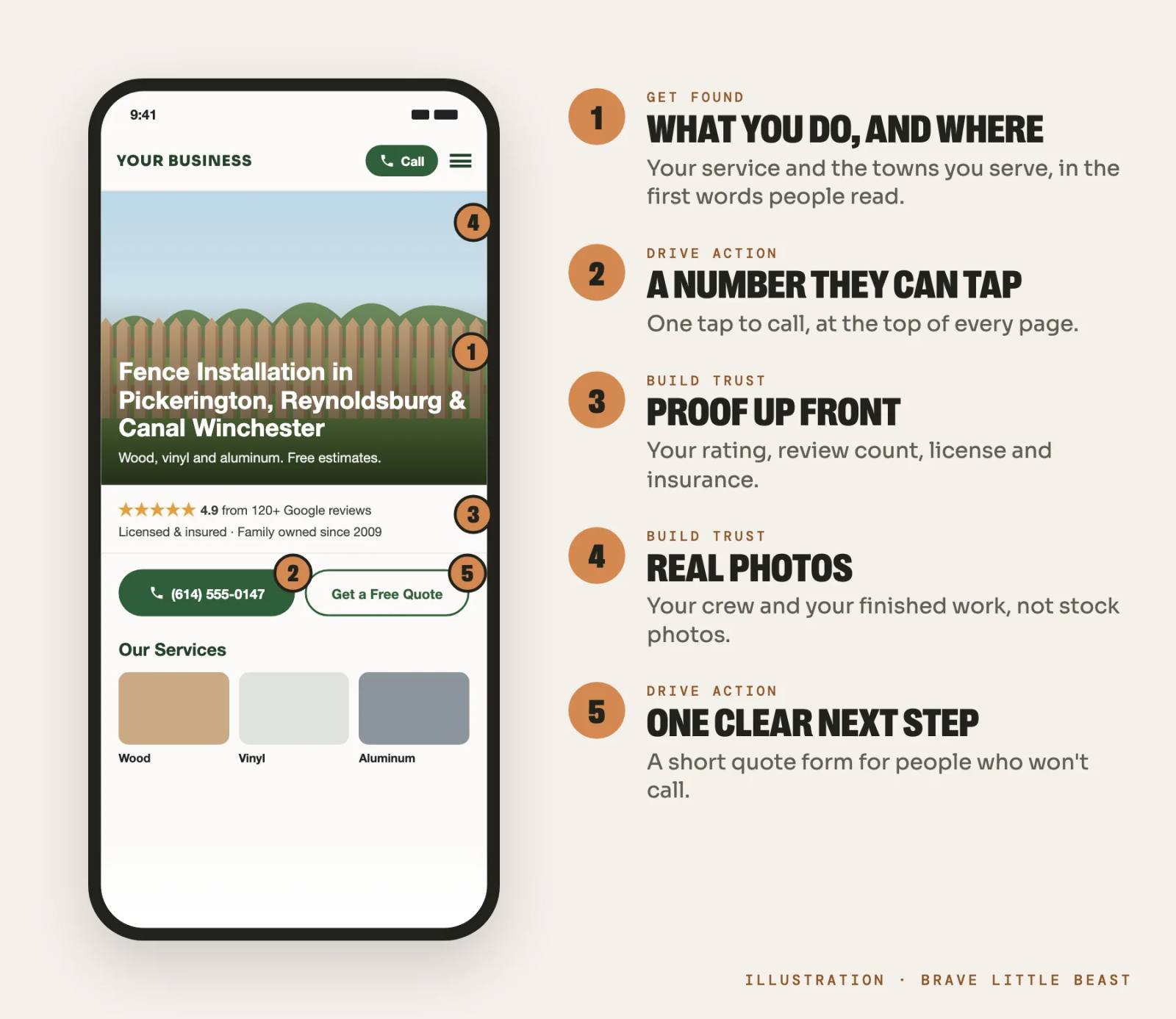
Get Found
On your Google Business Profile:
- Use your real business name, the one on your truck. Adding keywords breaks Google’s rules and can get the profile suspended.
- Choose the most specific primary category, and add secondary ones only for work you do. “Septic system service” beats “Contractor.”
- Fill in everything, including Google’s list of services and your hours, holidays too.
- If customers don’t come to you, hide your address and list the areas you serve. You’ll still rank mostly near the address you verified with, because the service area list doesn’t change where you show up (Sterling Sky). Farther out, your website has to do the work.
On your website:
- Give each service its own page, in the words customers use. Whitespark’s experts rank a dedicated page for each service as the top factor for local web results, and second for AI answers.
- Give your main towns their own pages, built from real jobs there. Copies with the town name swapped are what Google calls doorway pages, and they can hurt more than help.
- Answer the questions people ask before they call: price ranges, timing, permits, what happens first.
- Add the labels search engines read (structured data) for your name, services, hours, and service area.
Everywhere else, keep your name, address, and phone the same on Yelp, BBB, Apple Maps, Bing, and your trade’s directories, with one logo and one version of your name. If that’s where things fall apart, a simple brand kit is a smaller first step.
Build Trust
People weigh trust about as heavily as quality and price. In Edelman’s 2026 survey of almost 18,000 people, 88 percent called trusting the brand an important or critical reason to buy, level with quality (89 percent) and value (88 percent) (Edelman).
Reviews are the first place people look for proof, and the bar keeps rising: 68 percent only use businesses with four stars or more, 47 percent skip any with fewer than 20 reviews, and 74 percent look for reviews from the last three months (BrightLocal, 2026).
- Ask every customer, every time, with your Google review link or a QR code, while the job is fresh. In Sterling Sky’s study of more than 8,000 businesses, this month’s reviews mattered more than the lifetime total, and reviews with written comments counted for more than stars alone. Ask customers to say a line about the job.
- Don’t offer anything for a Google review, or only ask the customers you know are happy. Google forbids both, and the FTC’s 2024 rule bans paying for positive reviews and hiding negative ones (FTC).
- Reply to reviews, the good ones and the hard ones.
- Don’t sweat a few four-star reviews. In Northwestern’s study of online reviews, buying peaked at ratings of 4.0 to 4.7. A perfect 5.0 can look too good to be true.
Then make your website back it up. After reading good reviews, 54 percent of people go to the business’s website next (BrightLocal, 2026). People trust outside reviews more than testimonials a company posts about itself (Nielsen Norman Group), so show your Google rating and link to the reviews. Say you’re licensed and insured. Ohio already requires HVAC, electrical, plumbing, and hydronics contractors to show their license number on ads, cards, and trucks (Ohio Admin. Code 4101:16-2-05), so put it on the site too. Use real photos of your crew and your work. People look at those and skip stock photos (Nielsen Norman Group).
How the site looks counts too. People form a first impression of a web page in about a twentieth of a second, mostly from its design (Lindgaard and others, 2006). A dated or broken-looking site can undo what your reviews earned before anyone reads a word. The perceived quality of your brand is tied directly to the quality of your website.
Drive Action
The top-ranked business still loses the job if calling is hard. Only 6 percent of people say they just clicked the top result (BrightLocal, 2026). The rest are comparing.
- Put a phone number they can tap at the top of every page.
- Offer a short form as well as the phone number, never instead of it, and say when you’ll reply. Most people expect an answer within a day (Nielsen Norman Group).
- Make it fast on a phone. Google’s benchmark is the main content showing within 2.5 seconds (web.dev).
- Give price ranges where you can. Unclear pricing was the second most common reason people passed on a business (32 percent), and trade customers weigh pricing more than most (BrightLocal, 2026).
Why not just run ads?
Ads put you at the top today, at a price. In home and home improvement, the average Google search ad click cost $8.33 and the average lead about $91 in 2026 (WordStream by LocaliQ). Across 888 contractors on Google’s Local Services Ads, a lead averaged $53, and since fewer than half booked, each paying customer cost about $233 (SearchLight Digital).
Ads can make sense for a busy season or a new service. But they stop the day the budget does, and even Local Services Ads pull your name, address, and hours from your Google Business Profile.
Five Things to Start Today to Rank Higher on Google Maps
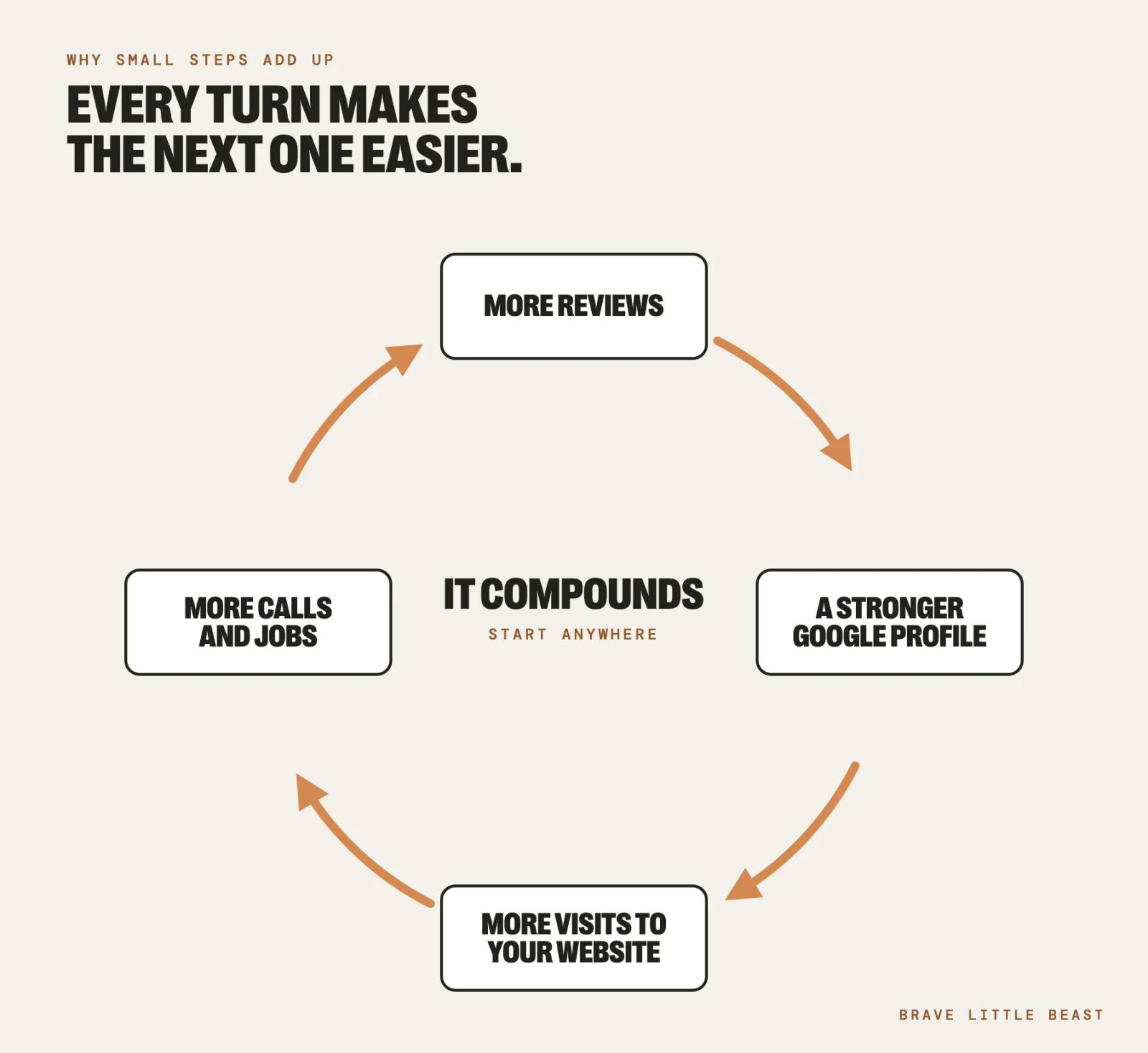
None of these is hard, and none of them is a one-time fix. They compound. More reviews make your profile stronger, which sends more people to your website. When the site answers their questions, more of them call, and more customers mean more reviews.
Run the Real Test and Save the Screenshots
Search your top three services on a phone from a town you want to work in. That’s your starting line. Check it again every month.
Fix Your Primary Category and Add Your Services
It takes about 10 minutes in your Google Business Profile.
Text Your Last Five Customers Your Review Link
Then make asking part of finishing every job.
Add Photos From Your Last Few Jobs
Put them on your Google profile and your website: the crew, the truck, the finished work.
Put a Tap-to-Call Number at the Top of Your Homepage
Or ask whoever runs your site to do it this week.
Profile changes usually show first, and reviews build month by month. New website pages take months to earn their place, so the best time to start them is before the phone goes quiet.
Where to Start
Run the test this week, from a customer’s driveway. If you’d rather have someone run it with you, our free website audit looks at your site’s health, its SEO, and how visible you are in Google and AI search, then tells you in plain language what we’d fix first. It’s yours to keep whether or not you work with us.
Get a Free Website AuditYour customers already say you do great work. Make it easy for the next one to find you and call.
Frequently Asked Questions
A newly verified Google Business Profile shows up once Google finishes reviewing it, and the same goes for edits. Showing up near the top for your service, beyond the area right around your address, takes longer. Expect months of steady reviews, a complete profile, and website pages for each service and the towns you serve.
If you can find your business by name, it is showing up. It just isn’t winning the searches customers run, like “fence company near me” from a few miles away. That usually comes down to a broad category, too few recent reviews, distance from the searcher, or a website that doesn’t have a page for the service or name the towns you serve.
No. A Google Business Profile is free, and Google says there’s no way to pay for a better local ranking. Businesses can buy ads that appear above or inside the map results, and those are labeled as sponsored. Everything else is earned.
There isn’t a set number, but in BrightLocal’s 2026 survey, 47 percent of consumers said they won’t use a business with fewer than 20 reviews, and 74 percent look for reviews from the last three months. A better benchmark is the three businesses that show up above you for your main search: aim to match their count, then keep new reviews coming every month.
Yes, if you want to show up beyond the area around your address. Your Google Business Profile carries the map results near you, but your website carries the regular search results, gives AI tools something to quote (business websites were 42 percent of the sources AI cited for local businesses in BrightLocal’s 2026 study), and is where 54 percent of people go after reading good reviews.
Keep Reading



Want Insights Like This in Your Inbox?
Join our mailing list. All Heart. No Ego.